Featured Post Today
print this page
Latest Post
Showing posts with label Switches. Show all posts

High Current Toggle Switch

Description
This circuit is particularly useful in controlling a load from several locations where the load may be switched on from one location and switched off from another. Any number of momentary (N/O) switches or push buttons may be connected in parallel.
The circuit uses a N-channel power MOSFET to control the load and can supply fairly large currents depending on the MOSFET used. The IRFZ44 is a 50 amp device available at electronic stores.
Circuit Diagram
The combination (10K, 10uF and diode) on the left side of the schematic insures the circuit powers on with the MOSFET turned off and the NPN transistor conducting. These components can be omitted if the initial power-on condition is not a concern. In this initial state (MOSFET off), the voltage at the gate of the MOSFET will be near zero and the voltage on the 1uF capacitor connected to the switches will also be near zero.
When a switch is closed, the 1uF capacitor is connected to the junction of the 220 ohm and 470K resistors causing the voltage to fall to near zero turning off the NPN transistor. As the transistor turns off, the collector voltage rises and turns on the MOSFET when the voltage climbs above about 3 volts. The drain terminal (D) of the MOSFET now moves close to ground preventing the NPN transistor from turning back on. When the switch is opened, the 1uF cap will charge through the 1M and 10K resistors to the full supply voltage. When a switch is again closed, the 1uF capacitor will cause the NPN transistor to turn back on due to the positive voltage on the capacitor applied to the junction of the two resistors (470K, 220). The MOSFET will now turn off and the drain voltage will rise to the supply voltage which in turn keeps the NPN transistor conducting with a positive voltage on the base. The circuit has now returned to the initial turn-on state.
The small (0.1uF) capacitor connected from the transistor base to ground functions to filter out noise that could cause false triggering if the switches are located far away from the circuit using long wires. If false triggering becomes a problem, either the capacitor value (0.1) or the 220 ohm resistor value can be increased to provide better filtering. Increasing these values however will increase the switching times of the MOSFET (rise and fall times) generating more heat when the MOSFET changes state. This is probably not a problem with small loads of a couple amps or less, but may be a problem at higher load currents. The circuit was tested at 1.5 amps using the IRF510 and 6 amps using the IRFZ44. 

0 comments

Multi Switch Doorbell With Indicators Circuit Diagram

Description
Here’s the circuit of a multi-switch input musical doorbell (shown in Fig.1). The circuit is built around the popular and less expensive quad D-latch CD4042B (IC1).
When switch S6 is pushed to ‘on’ condition, the circuit gets +9V and the four data inputs (D1 through D4) of ICI are in low state because these are tied to ground via resistors R1 through R4. Polarity input (POL) pin 6 of IC1 is also pulled down by resistor R5.
Circuit Diagram
Clock input (pin 5) of the quad D-latch is wired in normally low mode and hence all the four outputs (Q0 through Q3) have the same states as their corresponding data inputs. As a result, LED1 through LED4 are in off condition.
There are four switches fitted at four different doors/gates outside the home and a monitoring panel (as shown in Fig. 2) in the common room of the home. If any switch is pressed by a visitor (for example switch S1 at door 1), pins 2 and 4 of IC1 go high.
Simultaneously, pin 3 to IC1 (Q0 output) goes low and LED1 starts glowing to indicate that switch S1 is pressed by someone.
Next, output pin 13 of the dual 4-input NOR gate (IC2, here wired as a single 4-input OR gate) goes high to forward bias buzzerdriver transistor T1 via resistor R10.
The final result is a soft and pleasing musical bell, which lasts until reset switch S5 is pressedby the owner. For this latching arrangement, output pin 13 of IC2 from the NOR gate is fed back tothe clock input of IC1. The circuit costs around Rs 100.


Author T.K. HAREENDRAN
Source-http://www.atombus.biz/2012/02/multi-switch-doorbell-with-indicators.html
0 comments

Two-Tone Siren Circuit Schematic Diagram Using One IC

Description 
 This circuit is intended for children fun, and can be installed on bicycles, battery powered cars and motorcycles, but also on models and various games and toys. With SW1 positioned as shown in the circuit diagram, the typical dual-tone sound of Police or Fire-brigade cars is generated, by the oscillation of IC1A and IC1B gates. With SW1 set to the other position, the old siren sound increasing in frequency and then slowly decreasing is reproduced, by pushing on P1 that starts oscillation in IC1C and IC1D.
The loudspeaker, driven by Q1, should be of reasonable dimensions and well encased, in order to obtain a more realistic and louder output. Tone and period of the sound oscillations can be varied by changing the values of C1, C2, C5, C6 and/or associated resistors. No power switch is required: leave SW1 in the low position (old-type siren) and the circuit consumption will be negligible.
Circuit Schematic Diagram
Parts:

  • R1 = 470K - 1/4W Resistors
  • R2 = 680K - 1/4W Resistor
  • R3 = 470K - 1/4W Resistors
  • R4 = 82K - 1/4W Resistor
  • R5 = 330K - 1/4W Resistor
  • R6 = 10K - 1/4W Resistor
  • R7 = 33K - 1/4W Resistor
  • R8 = 3.3M - 1/4W Resistor
  • C1 = 10µF - 25V Electrolytic Capacitors
  • C2 = 10nF - 63V Polyester Capacitors
  • C3 = 100nF - 63V Polyester Capacitor
  • C4 = 100µF - 25V Electrolytic Capacitor
  • C5 = 10µF - 25V Electrolytic Capacitors
  • C6 = 10nF - 63V Polyester Capacitors
  • D1 = 1N4148 - 75V 150mA Diodes
  • D2 = 1N4148 - 75V 150mA Diodes
  • D3 = 1N4148 - 75V 150mA Diodes
  • Q1 = BC337 - 45V 800mA NPN Transistor
  • P1 = SPST Pushbutton
  • B1 = 6V Battery (4 AA 1.5V Cells in series)
  • IC1 = 4093 - Quad 2 input Schmitt NAND Gate IC
  • SW1 = DPDT Switch
  • SPKR= 8 Ohm Loudspeaker 
Source - http://www.extremecircuits.net/2009/12/two-tone-siren-circuit-schematic-using.html
0 comments

4 Digit Keypad Switch Circuit Diagram

Description
 This is a universal version of the Four-Digit Alarm Keypad. I've modified the design of the output section - to free up the relay contacts. This allows the circuit to operate as a general-purpose switch. I used a SPCO/SPDT relay - but you can use a multi-pole relay if it suits your application.
Do not use the "on-board" relay to switch mains voltage. The board's layout does not offer sufficient isolation between the relay contacts and the low-voltage components. If you want to switch mains voltage - mount a suitably rated relay somewhere safe - Away From The Board. 
 Circuit Diagram
 Notes:
The relay is energized by pressing a single key. Choose the key you want to use - and connect it to terminal "E". Choose the four keys you want to use to de-energize the relay - and connect them to "A B C & D". Wire the common to R1 and all the remaining keys to "F".

The Circuit is easy to use. When you press "E" - current through D2 & R9 turns Q6 on - and energizes the relay. The two transistors - Q5 & Q6 - form a "Complementary Latch". So - when you release the key - the relay will remain energized.

To de-energize the relay - you need to press keys "A B C & D" in the right order. When you do so - pin 10 of the IC goes high - and it turns Q4 on through R8. Q4 connects the base of Q6 to ground. This unlatches the complementary pair - and the relay drops out.

Any keys not wired to "A B C D & E" are connected to the base of Q3 by R7. Whenever one of these "Wrong" keys is pressed - Q3 takes pin 1 low and the code entry sequence fails. If "C" or "D" is pressed out of sequence - Q1 or Q2 will also take pin 1 low - with the same result. If you make a mistake while entering the code - simply start again.

The Keypad must be the kind with a common terminal and a separate connection for each key. On a 12-key pad - look for 13 terminals. The MATRIX TYPE with 7 or 8 terminals WILL NOT WORK. With a 12-key pad - over 10 000 different codes are available. If you need a more secure code - use a bigger keypad with more "Wrong" keys wired to "F". A 16-key pad gives over 40 000 different codes.

The Support Material for this circuit includes a step-by-step guide to the construction of the circuit board, a parts list, a detailed circuit description and more. 
 Board Layout
0 comments

5V 10A Switching Regulator by L4970A Circuit Diagram

Circuit Diagram
Description
Friends that seek 5V 10A power supply circuit small-sized and build easy. I begs for to advise this circuit. It is 10A switching regulator by use IC L4970A. Then build easy as an example integrated readymade circuit. Important point be power supply input must have 10A current sizes then can give power get enough. The detail is other of the circuit almost must not fine to decorate anything. If friends take an interest try seek buy the integrated circuit and other equipment. come to try build immediately yes.
Image Source www.st.com 
0 comments

Circuit Project: 12V Touch Switch Exciter

This circuit is designed to generate a 20KHz pseudo sine wave signal that can power about 50 remote touch activated switch circuits.  It can support a cable length of about 2500 feet.  A typical remote switch circuit is also shown as well as a receiver circuit for those switches.
Circiut Diagram
 Source: DiscoverCircuits
0 comments

Electronic Selector for 8 Sources

Description 
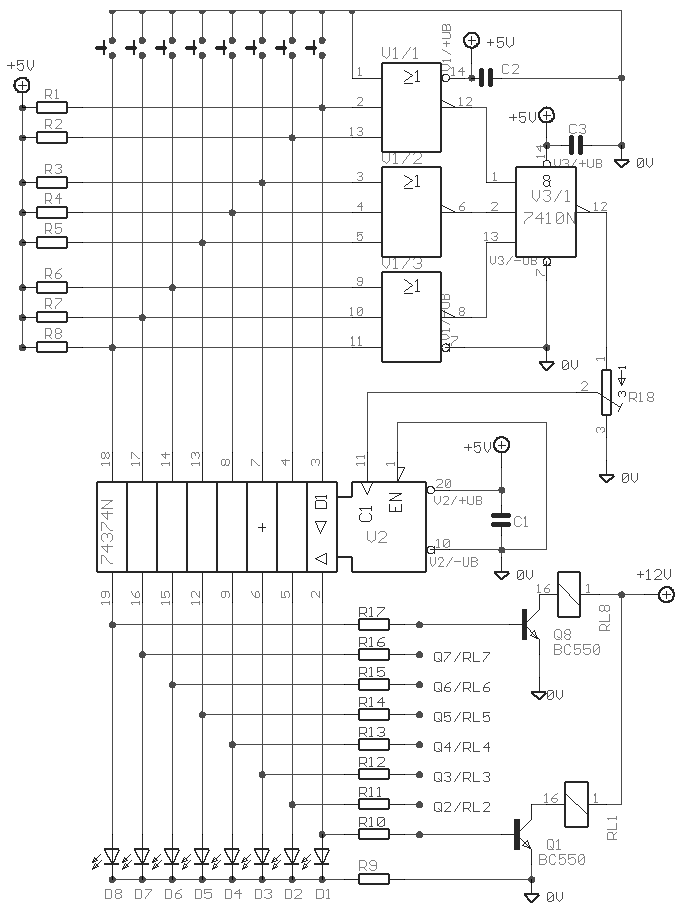
 The Elect. Sel. 8 is a simple circuit, with a choice of 8 sources of any sort ,of 8 independent switches. Each switch corresponding with a relay for example the switch S1 activates the RL1 e.t.c. The uses of the circuit are quite a few, choice of entrances in a sound amplifier, choice of command, in a digital circuit etc. In each entrance a LED which may be independent, except if switches with led are used. 
Circuit diagram

Part list

  • R1-8=10Kohms
  • R9=470 ohms
  • R10-17= 4.7Kohms
  • TR1=4.7Kohms Trimmer
  • IC1=74LS374
  • IC2=74LS27
  • IC3=74LS10
  • T1-8=BC550
  • D1-8=Led 3mm
  • C1-3=47nF 63V MKT
  • RL1-8= 6-12V DC Relay
  • S1-8=Push button SW 
Source http://users.otenet.gr/~athsam/Electronic_sel_8.htm
0 comments

Simple Touch Switch Circuit

Description
Similar to the CMOS based Touch Switch also on this site, this transistor based touch switch can activate a load simply by the user touching a metal plate. It is designed to directly switch a relay to allow it to be used with large loads. As it uses only a few commonly available transistors and a 12V supply, it is ideal for hostile environments where mechanical switches would be damaged. Using a latching relay and two of these circuits, a simple two pad "touch on/touch off" arrangement can be made. 
Circuit Diagram

Parts


Part

Total Qty.

Description

Substitutions
R1110 Meg 1/4W Resistor
R2147K 1/4W Resistor
R31120k 1/4W Resistor
R41470 Ohm 1/4W Resistor
C1115uF Electrolytic Capacitor
D111N4007 Silicon Rectifier Diode
Q112N5458 N Channel Field Effect Transistor
Q212N2222 NPN Transistor2N3904
Q312N3906 PNP Transistor
K11Relay w/12V Coil, Contacts To Suit Application
MISC1Board, Wire, Small Metal Pad For Touch Pad
Notes

  1. The touch pad can be most easily made by cutting a small square of PCB material and then soldering on a single wire. Alternatively, something like a penny glued to a plastic backing will do the job.
  2. As mentioned, a latching relay can be used so that a momentary touch activates the relay and it remains active. To turn off a latching relay, power must be interrupted. So a 2nd circuit with a normal relay can be used to cut power (use the NC contacts on the 2nd circuit). Placed side by side, two touch pads form an "on" and an "off" pad.
Source - http://www.aaroncake.net/circuits/Simple_Touch_Switch_Circuit.asp
0 comments

Relay Toggle Circuit Using a 556 Timer

Description 
 The circuit below illustrates generating a single positive pulse which is delayed relative to the trigger input time. The circuit is similar to the one above but employs two stages so that both the pulse width and delay can be controlled. When the button is depressed, the output of the first stage will move up and remain near the supply voltage until the delay time has elapsed, which in this case is about 1 second. The second 555 stage will not respond to the rising voltage since it requires a negative, falling voltage at pin 2, and so the second stage output remains low and the relay remains de-energized. At the end of the delay time, the output of the first stage returns to a low level, and the falling voltage causes the second stage to begin it's output cycle which is also about 1 second as shown. This same circuit can be built using the dual 555 timer which is a 556, however the pin numbers will be different.
Circuit diagram 


Source   http://www.bowdenshobbycircuits.info/page9.htm#toggle4.gif
0 comments

CMOS Toggle Flip Flop Using Laser Pointer

Description
The circuit below is similar to the one above but can be used with a laser pointer to toggle the relay rather than a push button. The IR photo transistor Q1 (Radio Shack 276-145A) or similar is connected to the set input (pin 6). The photo transistor should be shielded from direct light so that the voltage at the set input (pin 6) is less than 1 volt under ambient conditions and moves to more than 10 volts when illuminated by the laser pointer or other light source. The reset time is about a half second using a 4.7uF cap which prevents the circuit from toggling more than once during a half second interval. The 10K resistor and diode provide a faster discharge path for the 4.7uF cap so the circuit can be retoggled in less than 1 second. The 3K resistor in series with the photo transistor may need be adjusted for best performance. The relay shown is a solid state variety to be used with lights or other resistive loads at less than 3 amps. A mechanical relay can also be used as shown in circuit above. 
Circuit diagram

0 comments
 
Support : Creating Website | Johny Template | Mas Template
Copyright © 2011. The Circuit - All Rights Reserved
Template Created by Creating Website Published by Mas Template
Proudly powered by Blogger